
Platform documentation
NUS Campus Digital Twins
User Guide
A concise guide to the dashboard, its data sources and its main functions.
About
NUS Campus Digital Twins is a web-based Digital Energy Management Information System (DEMIS) for monitoring and analysing selected NUS buildings. It combines a campus map with building energy, weather and electricity-market context.
- Overview: explore included buildings on an interactive campus map.
- Buildings: review monthly and yearly electricity, cooling and PV profiles.
- Weather: compare SDE4 station observations with Kent Ridge reference weather.
- Energy Price: view a dated market record and open the official EMC / NEMS source.
Data sources
DEMIS, developed by the BIOR Lab, is the platform’s data foundation. BAS and weather-station points are accessed from the PI Server through the PI Web API. Docker-based Python collectors process the records and store mapped time-series values in InfluxDB. The DEMIS API then serves selected records to the dashboard.
Point mappings connect PI names and WebIds to consistent building codes and metrics while retaining timestamp, source and unit metadata. This allows data with different origins and update frequencies to be queried by building, variable and time range.
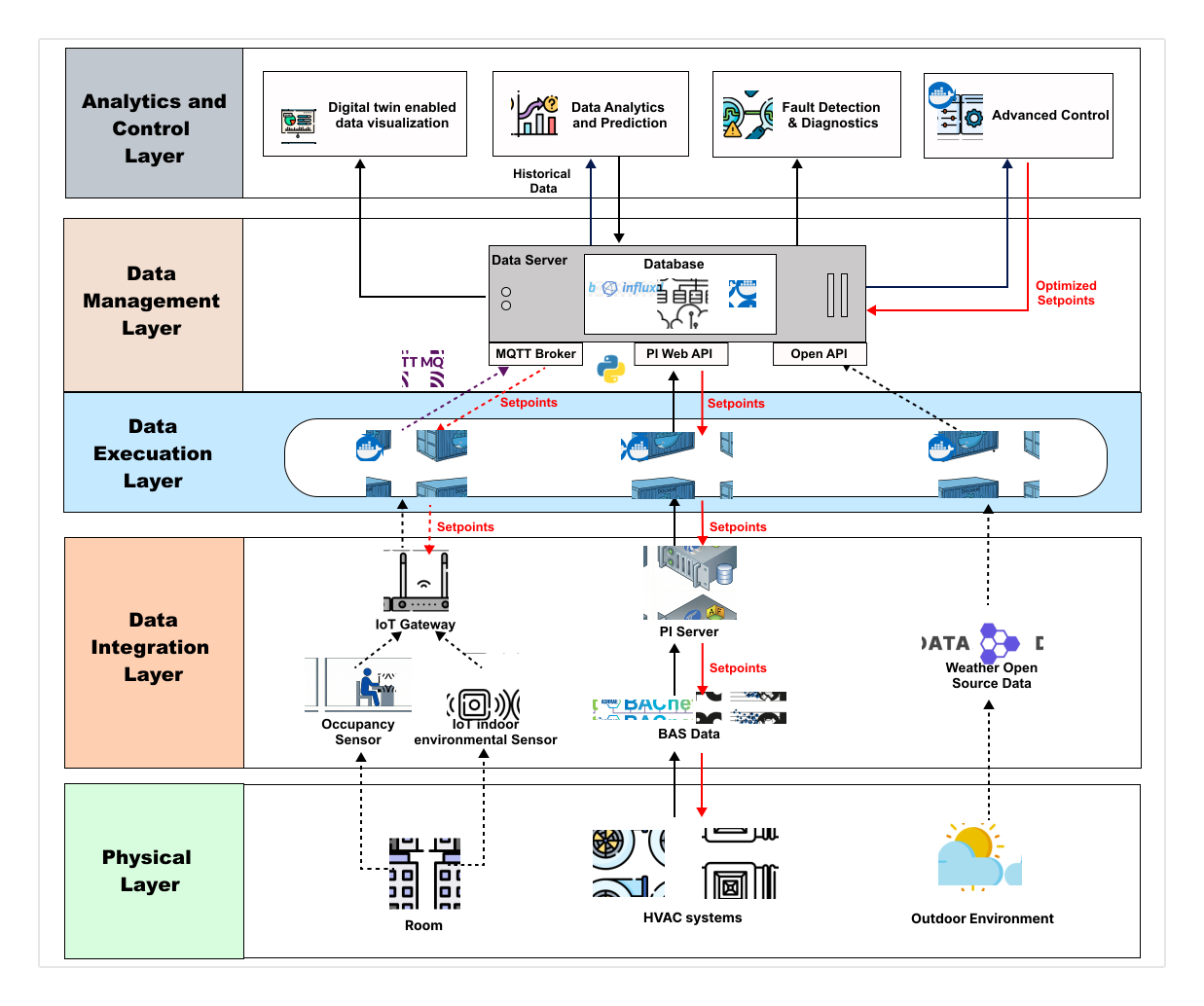
| Information | Source | How it is used |
|---|---|---|
| Building energy | DEMIS API | Electricity, cooling and PV profiles from mapped InfluxDB records. |
| On-site weather | DEMIS API · SDE4 station | Air temperature, humidity, wind direction and solar irradiance. |
| Reference weather | Open-Meteo ↗ | Recent and historical weather for the Kent Ridge reference location. |
| Electricity market | EMC / NEMS ↗ | Dated local record with a link to the official live source. |
Overview
The Overview maps included buildings across four campus districts. Click a district to zoom in; building labels and district colours appear at closer zoom levels.
Hover over a building for its name and available variables. Click to keep the information card open, then choose View building analysis to open its profile.
Buildings
In Buildings, select a building, choose Electricity, Cooling or PV, and then select a period. Availability varies by building.
| Period | Date range | Chart values |
|---|---|---|
| Monthly | Selected calendar month (28–31 days) | Daily reported energy totals, shown as a line |
| Yearly | Year to date | Monthly energy totals |
Yearly is the default. Monthly uses the most recent month with usable data. Hover over a point or bar to inspect its date and value.
Energy Price
Energy Price shows USEP, demand, solar output and VCP from a JSON record refreshed every 15 minutes when the source is available. Use View live data on EMC / NEMS for current official information.
Campus Weather
Weather opens with the SDE4 Weather Station from DEMIS. Choose NUS Kent Ridge for Open-Meteo reference weather. Times are shown in SGT.
| Period | Date range | Chart values |
|---|---|---|
| Weekly | Trailing 7 days | A sample every 3 hours |
| Monthly | Trailing 30 days | Daily averages |
| Yearly | Current calendar year, to the latest available historical date | Monthly averages of daily values |
SDE4 provides separate temperature, humidity, wind and solar charts and refreshes every five minutes while visible. Weekly samples use the nearest observation within 15 minutes of each three-hour mark; missing samples remain gaps. Kent Ridge combines temperature and humidity and also shows estimated WBGT and wind direction. Hover over a chart to inspect its observation time and value.
Interpretation
- Compare the same variable, unit, period and data coverage.
- Energy (kWh or MWh) and power (kW or MW) are not interchangeable.
- Check the source and timestamp; an old or missing value is not a new observation or a zero.
- Weather and market context can support analysis but do not prove why consumption changed.
Team & related platforms
NUS Campus Digital Twins is a platform from the Building Informatics & Operations Research (BIOR) Lab at the National University of Singapore.